Tripo AI: Revolutionizing 3D Modeling with TripoSR
If you searched for tripo ai, the short answer is this: Tripo AI is best understood as the hosted Tripo or Tripo3D product for generating 3D models from text, images, and multi-view inputs, while TripoSR is the open-source image-to-3D reconstruction model developed by Tripo AI and Stability AI and hosted under the VAST-AI-Research GitHub organization. Use the official hosted Tripo AI or Tripo3D product when you want the newest web workflow, account-based credits, text-to-3D, API access, rigging, stylization, or production convenience. Use local TripoSR when you want an open-source model you can inspect, run, modify, and integrate on your own machine.
TriposRai is independent. It is not the official Tripo AI, Tripo3D, Stability AI, or VAST AI website. This page is an independent guide for people trying to understand the relationship between Tripo AI 3D products, TripoSR AI research, local installation, licensing, and practical next steps.
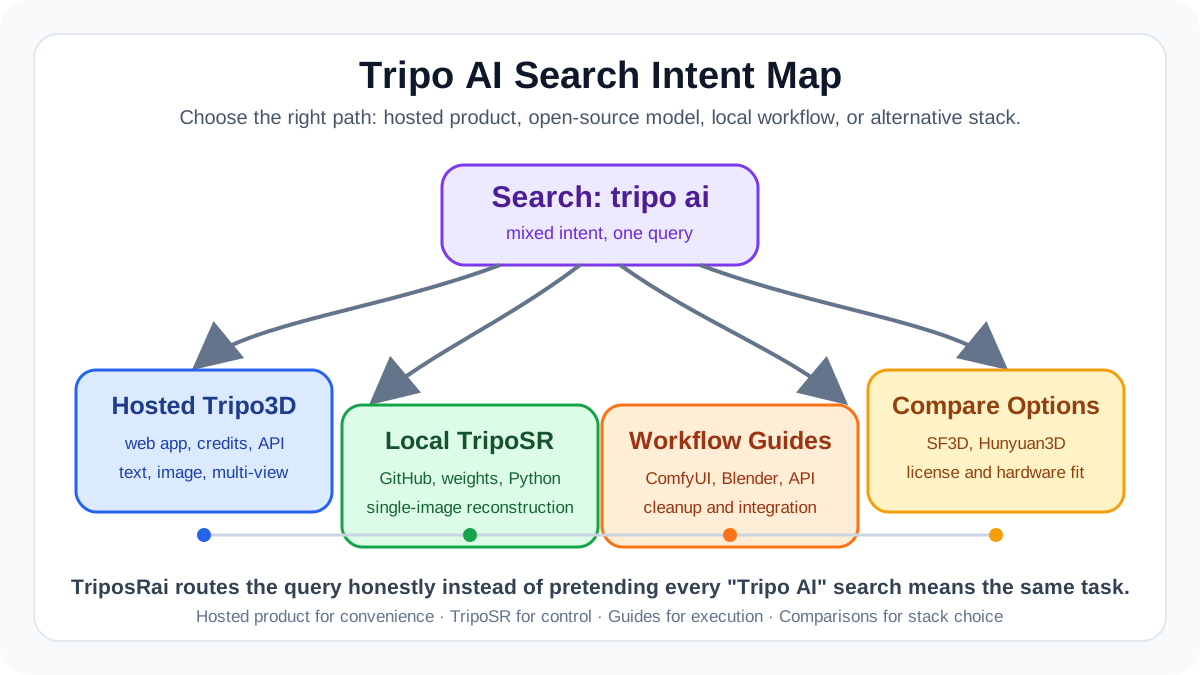
Quick Decision Table
| If your search intent is... | Best next step | Why |
|---|---|---|
| "I want to make a 3D model online now" | Use the official hosted Tripo AI or Tripo3D product | It is designed for browser-based generation, current product features, account credits, exports, and managed infrastructure. |
| "I want the Tripo AI GitHub or open-source version" | Start with TripoSR, not the hosted app | TripoSR is the open-source model and codebase associated with the image-to-3D research release. |
| "I want to install TripoSR locally" | Use the TripoSR GitHub Install Helper | It routes you through OS, Python, CUDA, and command choices without duplicating every setup step here. |
| "I have limited VRAM" | Use the TripoSR VRAM Optimization Calculator | It helps choose safer chunk sizes and local run settings. |
| "I need commercial-use guidance" | Use the TripoSR License Commercial Use tool | It focuses on MIT license basics, attribution, and practical compliance checks. |
| "I am comparing Tripo AI vs TripoSR" | Read the comparison table below | The hosted product and the open-source model solve overlapping but different jobs. |
| "I want a Tripo AI alternative" | Compare TripoSR, SF3D, Hunyuan3D, and other open models | Start with TripoSR vs SF3D and the open-source 3D reconstruction showdown. |
What Is Tripo AI?
Tripo AI usually refers to the Tripo or Tripo3D product set for hosted AI 3D generation. The official product is aimed at creators who want to generate 3D assets from text prompts, single images, or multiple reference views without setting up a local machine learning environment. Current official Tripo3D pages describe features such as image-to-model, text-to-model, multi-image-to-3D, animation, stylization, post-processing, and API access.
This is the product side of the story. It is the choice for users who care more about speed of use than model internals. You sign in, upload or prompt, generate, review, enhance, and export. For many artists, game teams, product mockup workflows, and casual 3D printing experiments, that hosted path is the lowest-friction route.
The phrase tripo ai 3d can also lead people to TripoSR. That is where search results get confusing. TripoSR is not the current hosted Tripo AI product. It is an open-source research model for fast single-image 3D reconstruction. It was released as code and model weights so developers and researchers could run it locally, study it, build integrations, and compare it with other open image-to-3D methods.
What Is TripoSR?
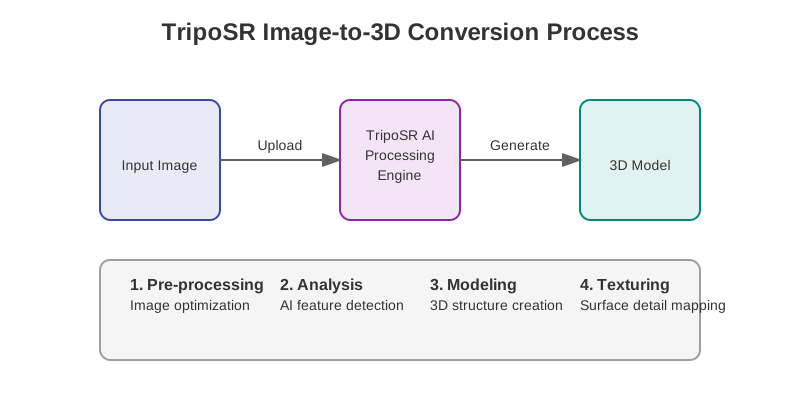
TripoSR is a feed-forward 3D reconstruction model that takes a single image and predicts a 3D object representation that can be exported as a mesh. The official GitHub repository describes it as an open-source model for fast 3D reconstruction from a single image, collaboratively developed by Tripo AI and Stability AI, with VAST AI Research as the GitHub organization hosting the code.
The technical report presents TripoSR as a model inspired by the Large Reconstruction Model line of work. In practical terms, that means TripoSR is built for direct image-to-3D reconstruction rather than a manual modeling workflow. You provide an object image, the model estimates the object shape, and the pipeline outputs a 3D asset. Like other AI 3D tools, the result should be treated as a generated starting point, not as guaranteed final production geometry.
Video: An official Tripo AI introduction to TripoSR. Watch this first if you want the original release context before deciding between hosted Tripo AI and local TripoSR.
Watch on YouTube: Official TripoSR introduction by Tripo AI.
For searchers, the most important distinction is this:
- Tripo AI: commonly searched as the online hosted AI 3D product or company/product brand.
- Tripo3D: the official product and API brand often used for the hosted web and developer platform.
- TripoSR: the open-source image-to-3D model and codebase.
- Tripo SR: a spaced search variation that usually means TripoSR.
- TriposRai: this independent guide site, focused on TripoSR, local workflows, comparisons, tools, and tutorials.
How Tripo AI, Tripo3D, and TripoSR Relate
Tripo AI and Tripo3D are part of the product-facing path: web app, account, API, generation features, exports, and paid or credit-based workflows. TripoSR is part of the research and open-source path: code, weights, local setup, command-line usage, and integration work.
The relationship works best as a lineage and workflow split. Tripo AI contributed to TripoSR, and TripoSR helped make fast image-to-3D reconstruction accessible to developers. The hosted Tripo3D product continued evolving as a broader commercial platform with features beyond the original TripoSR release. That broader platform can include text-to-3D, multi-image workflows, model versions, stylization, animation, post-processing, and API operations that are not the same as running the open TripoSR repository locally.
So if you are asking “is Tripo AI the same as TripoSR?” the accurate answer is no. They are related, but not identical. TripoSR is an open-source model release associated with Tripo AI and Stability AI, with code hosted under VAST-AI-Research. Tripo AI or Tripo3D is the hosted service and product platform.
That distinction matters because users often arrive with different goals. Someone searching tripo ai download may want a mobile app, a desktop installer, a local model, or an unofficial APK. Those are very different intents. For local open-source work, the safer route is the official TripoSR GitHub repository and model weights. For hosted product use, the safer route is the official Tripo3D site and platform. For mobile APK searches, be careful: unofficial APK downloads can carry security, account, malware, licensing, and privacy risks.
Tripo AI vs TripoSR
| Category | Tripo AI or Tripo3D hosted product | TripoSR local open-source model |
|---|---|---|
| Best for | Fast web-based 3D generation, non-technical workflows, API access, current commercial features | Developers, researchers, local experimentation, offline control, open-source integrations |
| Input types | Official product pages describe text-to-3D, image-to-3D, multi-image-to-3D, and related workflows | Primarily single-image object reconstruction in the open TripoSR release |
| Setup | Browser account or API key | Python environment, dependencies, model weights, GPU or CPU considerations |
| Infrastructure | Managed by the hosted platform | Managed by you on local hardware or your own server |
| Cost model | Usually account, credits, plan, or API pricing | Open-source code is available, but you pay for hardware, cloud compute, maintenance, and time |
| Customization | Product controls exposed by the hosted service | Code-level customization is possible if you are comfortable with ML tooling |
| Privacy posture | Inputs go through the hosted service, subject to its current terms and policies | Inputs can stay local if you run the model locally |
| Output expectations | Often more productized, with export and enhancement features | Useful generated meshes, but expect cleanup and workflow tuning |
| Commercial use | Governed by the current official Tripo product terms | Governed by the TripoSR license and any dependencies or model-weight terms you rely on |
| Best next link | Official Tripo3D product or API docs | TripoSR GitHub Install Helper |
When To Use The Official Hosted Tripo AI Product
Use the official hosted Tripo AI or Tripo3D product if your priority is convenience. A hosted product is usually the right fit when you need a model today, do not want to debug Python packages, or want access to the newest Tripo product features. It is also the better path if your workflow depends on text-to-3D, multi-view generation, productized exports, account-based storage, style options, post-processing, API billing, or team-friendly access.
Hosted tools are especially practical for:
- Concept artists who want quick 3D drafts from sketches or prompts.
- Game artists who need base meshes for ideation before manual cleanup.
- E-commerce teams testing 3D product visualization from object photos.
- Developers who want an API rather than a local ML deployment.
- 3D printing hobbyists who want a starting mesh and are willing to repair it.
- Non-technical users who would rather spend time choosing outputs than managing CUDA.
The tradeoff is control. You depend on the provider’s terms, pricing, uptime, model versions, moderation rules, export options, privacy policy, and API limits. For many users, that tradeoff is acceptable. For others, especially researchers and developers building custom local pipelines, it can become limiting.
When To Use Local TripoSR Instead
Use local TripoSR when you want the open-source route. This is the better option if you want to inspect the code, run experiments, build a custom interface, keep images local, automate batch jobs on your own machine, compare model behavior against SF3D or Hunyuan3D, or learn how feed-forward image-to-3D reconstruction works.
Local TripoSR is also attractive when your workflow is narrow. If all you need is single-image object reconstruction, and you are comfortable with Python, then a local setup can be more transparent than a hosted product. You can decide how inputs are preprocessed, how outputs are stored, what command-line flags to use, and how results move into Blender, ComfyUI, or an API service.
The tradeoff is responsibility. You own installation, dependency conflicts, GPU memory limits, output conversion, and downstream cleanup. You also need to read the license and understand your commercial-use obligations. If you do not want that work, the official hosted Tripo AI product is likely a better fit.
Video: A third-party walkthrough of a local TripoSR image-to-3D workflow. Use it as context, then verify install commands and license details against the official repository before production use.
Watch on YouTube: Local TripoSR image-to-3D walkthrough.
Local TripoSR Roadmap
This page is an intent hub, so it will not duplicate every setup tutorial. Use the roadmap below to choose the next step:
-
Install from GitHub Start with the TripoSR GitHub Install Helper. It is built for people searching tripo ai github, tripo ai open source, tripo sr github, or tripo ai download when they really mean the local TripoSR repository.
-
Check your VRAM before running heavy settings Use the TripoSR VRAM Optimization Calculator before assuming your GPU can handle every setting. This is useful for 6 GB, 8 GB, 12 GB, and shared-memory machines.
-
Review commercial-use basics Use the TripoSR License Commercial Use tool if you plan to use generated assets or the model in client, product, marketplace, or studio workflows.
-
Integrate with ComfyUI If your image generation pipeline already lives in ComfyUI, start with the TripoSR ComfyUI Workflow Generator to download a real Flowty JSON workflow and copy install commands, then read the TripoSR ComfyUI node guide for the full setup context.
-
Bring results into Blender If you care about cleanup, materials, topology checks, or export preparation, continue with the TripoSR Blender addon workflow tutorial.
-
Build an internal service or app If you want TripoSR behind a tool, script, or web service, use the TripoSR API integration guide.
-
Compare alternatives before committing If you are choosing a stack, compare TripoSR vs SF3D, Hunyuan3D vs Tripo, and the broader open-source 3D reconstruction showdown.
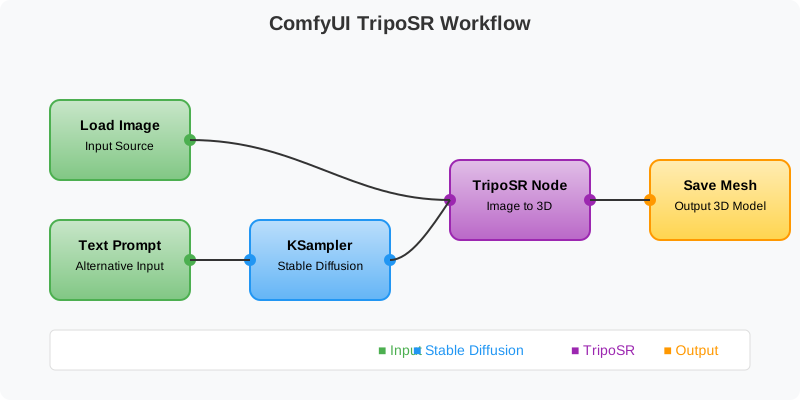
What TripoSR Is Good At
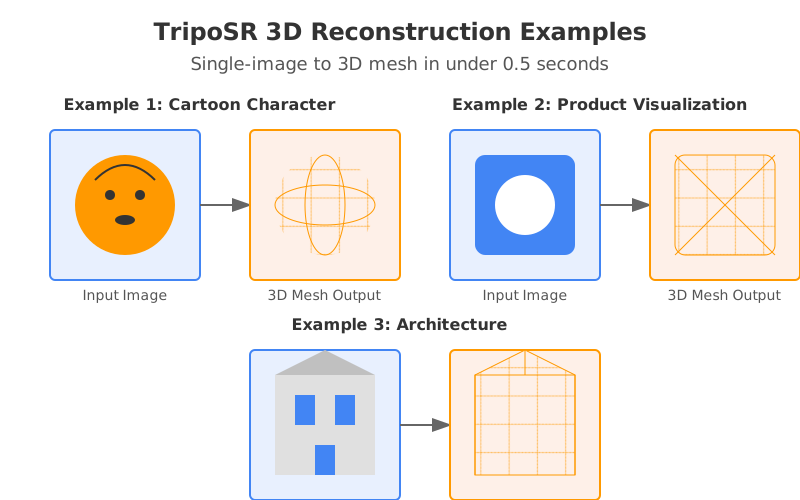
TripoSR is strongest when you treat it as a fast reconstruction component. It can turn a clean single object image into a usable 3D starting point quickly, especially when the input has a clear subject, limited occlusion, and a view that reveals the object’s main form. For experiments, prototypes, and early-stage asset generation, that speed matters.
It is also useful as an educational model. Because the code is open, developers can inspect the pipeline, test inputs, evaluate outputs, and learn how modern single-image reconstruction systems behave. That is difficult to do with a fully hosted product where the model and serving stack are hidden behind an API.
The most realistic expectation is “fast draft, then refine.” Generated meshes may need scale correction, mesh cleanup, retopology, material work, UV cleanup, or manual sculpting depending on the asset and use case. That is not a failure of TripoSR specifically. It is a normal part of current AI 3D workflows, especially when moving from a single 2D view to a usable 3D asset.
What TripoSR Is Not
TripoSR is not a full replacement for a 3D artist. It is not guaranteed to produce game-ready topology from any random image. It is not the same as the full hosted Tripo AI product, and it should not be marketed as an unofficial free version of every current Tripo3D feature.
It is also not a shortcut around licensing review. The TripoSR repository is open source, but your actual use may involve dependencies, generated outputs, third-party input images, client assets, marketplace rules, and product policies. If commercial use matters, check the license and keep records of what model, repository, dependency versions, and source images you used.
Finally, TripoSR is not an Android APK or a cracked mobile app. If you see tripo ai mod APK or unofficial mobile packages in search results, that is a different and riskier category than open-source TripoSR.
Tripo AI Alternative Options
If you are searching for a tripo ai alternative, decide first whether you need a hosted product or an open-source local model.
For hosted product alternatives, you may compare Tripo3D with other commercial AI 3D services based on output quality, speed, export formats, API pricing, terms, privacy, support, and whether the tool supports your specific asset type. Product comparison changes quickly, so read current official pricing and documentation before making a production decision.
For open-source alternatives, compare TripoSR with models such as SF3D and Hunyuan3D-related workflows. TripoSR is attractive for speed and simplicity. SF3D is often evaluated for more advanced reconstruction and texturing behavior. Hunyuan3D workflows may be interesting when you want a broader open 3D generation stack. The right answer depends on your hardware, license constraints, texture requirements, geometry tolerance, and downstream software.
If you need a practical starting point, begin with these comparisons:
Practical Workflow Recommendations
For a creator who wants results quickly, start hosted. Use official Tripo AI or Tripo3D, generate several variations, export the best candidate, and clean it up in Blender or your target tool. This gives you the fastest learning loop.
For a developer who wants control, start local. Install TripoSR from GitHub, run a small set of test images, track your command settings, and compare outputs before building a larger pipeline. Keep your first integration simple. A folder-in, mesh-out script is easier to debug than a full web application.
For a studio evaluating production use, test both. Hosted Tripo AI may be better for designers and artists who need productized features. Local TripoSR may be better for controlled internal tools, private image handling, research, and experimentation. Use the same input set across tools and judge geometry, texture, editability, license fit, and total workflow time, not just the first visual impression.
For SEO and content teams, avoid thin “free Tripo AI” pages that simply wrap another service. Users searching tripo ai are often trying to make a decision: official product, open-source model, local install, API, commercial use, or alternative. A useful page should route them honestly.
FAQ
Is Tripo AI the same as TripoSR?
No. Tripo AI usually refers to the hosted Tripo or Tripo3D product platform. TripoSR is an open-source image-to-3D reconstruction model associated with Tripo AI and Stability AI, with code hosted under VAST-AI-Research. They are related, but they are not the same thing.
Is TripoSR official Tripo AI software?
TripoSR is an official open-source TripoSR codebase released through the VAST-AI-Research GitHub organization and described by official Stability AI materials as a collaboration with Tripo AI. This site, TriposRai, is not official Tripo AI software and is not operated by Tripo AI, Tripo3D, Stability AI, or VAST.
Is TripoSR open source?
Yes. The public TripoSR repository is open source and uses the MIT license in the GitHub repository. If you plan to use it commercially, also check model weights, dependencies, third-party input rights, and any policies that apply to your distribution or marketplace.
Can I use TripoSR commercially?
The TripoSR GitHub repository uses the MIT license, which is generally permissive, including commercial use. That does not remove every responsibility. You should preserve required notices, review dependencies, confirm model-weight terms, avoid using images you do not have rights to, and check marketplace or client rules. For a practical checklist, use the TripoSR License Commercial Use tool.
Where is the Tripo AI GitHub?
For open-source TripoSR work, the relevant repository is the VAST-AI-Research TripoSR repository on GitHub. If you are looking for the hosted Tripo3D product, GitHub is probably not the right starting point. Use official Tripo3D product or API documentation instead.
Is there a Tripo AI open-source download?
There is an open-source TripoSR codebase and model release, but that is not the same as downloading the full hosted Tripo AI or Tripo3D product. If your goal is local image-to-3D reconstruction, use TripoSR. If your goal is the latest hosted product features, use the official hosted service.
Should I download a Tripo AI mod APK?
No. Avoid unofficial mod APK downloads. They can expose you to malware, stolen credentials, broken updates, account bans, privacy risks, and unclear licensing. If you want hosted Tripo AI or Tripo3D, use official channels. If you want an open-source local workflow, use the official TripoSR repository rather than an unofficial APK.
Is TripoSR a good Tripo AI alternative?
It can be a good alternative for local single-image reconstruction, especially for developers and researchers. It is not a full replacement for every hosted Tripo AI or Tripo3D feature. If you need text-to-3D, multi-image workflows, productized enhancement, or managed API access, the hosted product may be the better fit.
What does “tripo sr” mean?
“Tripo SR” is usually a spaced version of TripoSR. Searchers often use it when looking for the open-source model, GitHub repository, install steps, or local download guidance.
Clean References
- Official Tripo3D API page
- Official Tripo3D text-to-3D feature page
- Official Tripo3D platform documentation
- Stability AI: Introducing TripoSR
- VAST-AI-Research TripoSR GitHub repository
- TripoSR technical report on arXiv
Conclusion
The best path depends on what you meant by tripo ai. If you want the official web product, current generation features, text-to-3D, API access, and managed infrastructure, use Tripo AI or Tripo3D through official channels. If you want open-source local image-to-3D reconstruction, use TripoSR and treat it as a fast, inspectable, developer-friendly model.
For local work, start with the TripoSR GitHub Install Helper, check hardware with the VRAM calculator, review commercial use with the license tool, then choose the ComfyUI, Blender, API, or comparison guide that matches your workflow. That route keeps the decision clear: hosted Tripo AI when you want convenience, local TripoSR when you want control.