ArtCraft Photoshop: Free Open-Source Adobe Suite Alternative (All 7 Tools & Download)
TL;DR: When creators search for “ArtCraft Photoshop”, they are seeking PhotoCraft—the flagship image editing app within ArtCraft, an ambitious open-source initiative created by software engineer Brandon Thomas. Built entirely in Rust and released under MIT and Apache 2.0 licenses, ArtCraft delivers a 7-app clean-room suite designed to replace the entire Adobe Creative Cloud ecosystem for free. While it is currently in early alpha and not yet ready to handle mission-critical agency deadlines, its speed, zero-subscription model, and offline-first ethos make it one of the most exciting creative software developments in years.
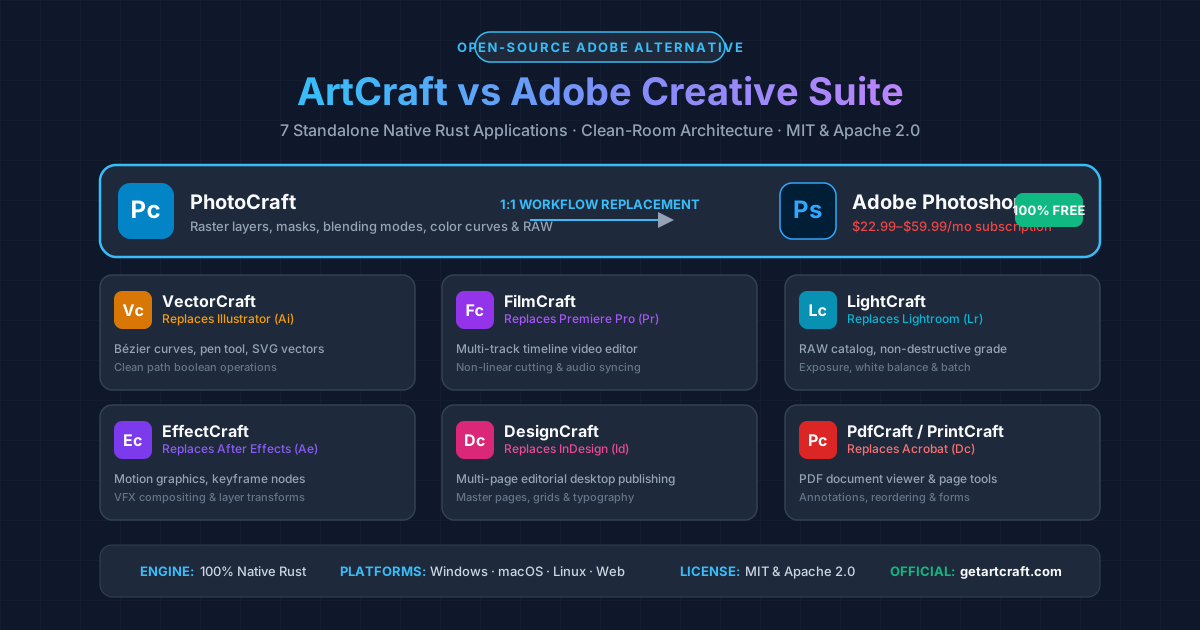 Figure 1: Complete architecture map of ArtCraft’s 7 open-source applications compared to their Adobe Creative Cloud counterparts.
Quick Answer: What Is ArtCraft & Can It Replace Photoshop?
| Dimension | ArtCraft PhotoCraft | Adobe Photoshop CC |
|---|---|---|
| Price | $0 (Free Forever) | $22.99/mo (single app) to $59.99/mo (all apps) |
| License | Open Source (MIT & Apache 2.0) | Proprietary commercial subscription |
| Underlying Tech | 100% Native Rust (AI-assisted with Claude Opus) | C++ / Objective-C legacy codebase + Electron |
| System Footprint | Ultralight single binary; instant launch; 0 daemons | 2+ GB RAM idle; multiple background sync daemons |
| Privacy & Storage | 100% Local-first; offline; zero telemetry | Mandatory cloud sign-in; cloud sync; AI terms scrutiny |
| Maturity Stage | Early Alpha / Active Development | 35+ years of enterprise refinement |
| Best For | Hobbyists, indie creators, anti-subscription advocates | Enterprise agencies, commercial print shops, VFX studios |
| Official Portal | getartcraft.com | adobe.com/photoshop |
1. What Is ArtCraft? The Backstory Behind the Open-Source Creative Suite
For decades, digital designers, video editors, and photographers have voiced mounting frustration over Adobe’s pricing structure. Between perpetual subscription lock-ins, steep early termination penalties, and controversial updates to terms of service regarding cloud content inspection, creators have actively searched for real alternatives.
In late 2025 and early 2026, software engineer Brandon Thomas launched ArtCraft to address this problem directly. Rather than building a single isolated utility, the project launched with an audacious scope: re-implement the entire Adobe Creative Cloud suite from scratch as clean-room, open-source software.
Key Technical Pillars of ArtCraft
- Engineered in Rust: By leveraging Rust, ArtCraft applications achieve memory safety, blazing runtime performance, and rapid compilation across desktop operating systems (macOS, Windows, Linux) as well as the web via WebAssembly (Wasm).
- AI-Assisted Architecture: The codebase was bootstrapped and developed with the assistance of advanced AI models (notably Claude Opus 5.5). Crucially, the apps are architected so that AI agents can programmatically inspect the canvas, execute actions, and script multi-step design operations.
- True Open Source (MIT / Apache 2.0): Unlike “freemium” software that hides essential export formats behind a paywall, ArtCraft code is published under permissive open-source licenses on GitHub under the
storytoldorganization. - Zero Vendor Lock-in: There are no mandatory user accounts, no cloud sync tethers, and no background licensing daemons consuming CPU cycles in the background.
2. The 7 Tools in the ArtCraft Suite: Full Breakdown
ArtCraft is organized into 7 distinct creative applications, each mapped 1:1 against a core pillar of Adobe Creative Cloud:
ArtCraft Suite (Open Source / Rust)
 ├── PhotoCraft  ─────────► Replaces Adobe Photoshop (Raster Editor)
 ├── VectorCraft ─────────► Replaces Adobe Illustrator (Vector Design)
 ├── FilmCraft   ─────────► Replaces Adobe Premiere Pro (Video Editing)
 ├── LightCraft  ─────────► Replaces Adobe Lightroom (RAW Photo Processing)
 ├── EffectCraft ─────────► Replaces Adobe After Effects (Motion & VFX)
 ├── DesignCraft ─────────► Replaces Adobe InDesign (Editorial Publishing)
 └── PdfCraft    ─────────► Replaces Adobe Acrobat (PDF Studio)
1. PhotoCraft (Adobe Photoshop Alternative)
PhotoCraft is the flagship application that drives the majority of “ArtCraft Photoshop” search queries.
- Core Purpose: Digital raster image editing, photo manipulation, compositing, and retouching.
- Key Features:
- Multi-layer canvas with visibility toggles, opacity control, and standard blending modes (Multiply, Screen, Overlay, etc.).
- Essential selection toolset (marquee, lasso, and color-range boundary detectors).
- Raster brushes, eraser, stamp/clone tools, and gradient fills.
- Image adjustments: Levels, Curves, Hue/Saturation, Color Balance, and Brightness/Contrast.
- Native export to standard web formats (PNG, JPEG, WebP) with basic PSD import parsing.
- Current Alpha Status: The interface is responsive and launches in milliseconds. However, advanced capabilities like Smart Object nesting, non-destructive filter stacks, neural inpainting, and complex CMYK pre-press color separations are still under heavy development.
2. VectorCraft (Adobe Illustrator Alternative)
- Core Purpose: Vector illustration, logo creation, typography layout, and iconography.
- Key Features:
- Precision Bézier curve pen tool with anchor point controls and tangent handles.
- Shape generators (rectangles, ellipses, polygons, stars).
- Path manipulation operations (Boolean Union, Difference, Intersection, and Exclusion).
- Scalable Vector Graphics (SVG) import, rendering, and export.
- Workflow Role: VectorCraft serves graphic designers creating crisp visual assets that scale infinitely without pixelation, eliminating the need for Adobe Illustrator for everyday UI and icon design.
3. FilmCraft (Adobe Premiere Pro Alternative)
- Core Purpose: Non-linear video editing (NLE) and audio assembly.
- Key Features:
- Multi-track timeline supporting parallel video, overlay, and audio stems.
- Standard cutting toolset: Razor, Ripple Edit, Slip, and Slide.
- Real-time preview playback engine powered by native hardware video decoding.
- Basic keyframe automation for position, scale, and volume envelopes.
- Workflow Role: FilmCraft targets YouTube creators, social media editors, and indie filmmakers who need clean video assembly without Premiere Pro’s notorious crash bugs and subscription overhead.
4. LightCraft (Adobe Lightroom Alternative)
- Core Purpose: Non-destructive RAW photo development, color grading, and asset cataloging.
- Key Features:
- Direct decoding of popular RAW formats from Sony, Canon, Nikon, and Fujifilm.
- Parametric adjustment sliders: Exposure, Highlights, Shadows, Whites, Blacks, Contrast, and Clarity.
- White balance calibration with Kelvin temperature and tint sliders.
- Tone Curve editor (RGB and individual color channels).
- Batch export pipeline for high-volume photo shoots.
- Workflow Role: Ideal for landscape, event, and portrait photographers looking to organize collections and grade RAW exposures locally.
5. EffectCraft (Adobe After Effects Alternative)
- Core Purpose: 2D motion graphics, visual compositing, and title animations.
- Key Features:
- Spatial and temporal keyframe curve editor.
- Layer parent-child hierarchies and transform rigging (Position, Scale, Rotation, Anchor Point, Opacity).
- Basic particle emitters, blend-mode compositing, and shape layer morphing.
- Workflow Role: Provides motion designers with an open-source canvas for animated lower-thirds, explainer video graphics, and social media kinetic typography.
6. DesignCraft (Adobe InDesign Alternative)
- Core Purpose: Multi-page desktop publishing, editorial layout, and print formatting.
- Key Features:
- Master page templates and automated page numbering.
- Multi-column text frames with automatic text reflow and hyphenation.
- Margin, bleed, and baseline grid alignment guides.
- High-resolution image frame placement and cropping.
- Workflow Role: Built for authors, zine creators, indie publishers, and marketers designing brochures, whitepapers, e-books, and magazines.
7. PdfCraft / PrintCraft (Adobe Acrobat Alternative)
- Core Purpose: PDF document viewing, form editing, page reordering, and annotation.
- Key Features:
- High-fidelity PDF rendering engine.
- Page manipulation: insert, delete, rotate, extract, and reorder PDF pages.
- Digital signature placement, text annotation, and shape highlights.
- Document size optimization and metadata sanitation.
- Workflow Role: Replaces the expensive Acrobat Pro license for day-to-day office document signing, combining, and reviewing.
3. Head-to-Head Comparison: PhotoCraft vs. Adobe Photoshop
To understand whether ArtCraft’s PhotoCraft can serve as your daily driver, consider how it stacks up across real-world workflows:
| Feature / Capability | PhotoCraft (ArtCraft) | Adobe Photoshop CC | Winner / Verdict |
|---|---|---|---|
| Startup Speed | < 0.5 seconds (Rust binary) | 8–20 seconds (plugins, fonts, sync) | PhotoCraft (Instant) |
| Monthly Cost | $0.00 Forever | $22.99 – $59.99/mo | PhotoCraft (Massive Savings) |
| Layers & Masks | Basic to Intermediate | Advanced (Clipping, Layer Styles, Smart Filters) | Photoshop (More versatile) |
| Smart Objects | Planned / In development | Industry gold standard | Photoshop |
| Color Space Support | sRGB, basic RGB | sRGB, Adobe RGB, ProPhoto RGB, CMYK, LAB, Spot Channels | Photoshop (Essential for print) |
| AI Features | AI-agent automation hooks | Generative Fill, Neural Filters, Remove Tool | Photoshop (Mature generative tools) |
| System Privacy | Zero telemetry, offline local storage | Cloud sync, usage analytics, account check-ins | PhotoCraft (Private & Sovereign) |
| Plugin Ecosystem | Emerging community crates | Decades of third-party plugins (.8bf, CEP, UXP) | Photoshop |
| Hardware Overhead | Minimal RAM & GPU footprint | Heavy memory and disk cache consumption | PhotoCraft (Lightweight) |
4. How to Download, Install, and Run ArtCraft
Getting started with ArtCraft is straightforward thanks to its multi-platform deployment strategy.
Note: ArtCraft is currently in early alpha. Availability of prebuilt binaries and specific release packages may vary as the project evolves rapidly. Always check getartcraft.com as the authoritative source for the latest download links and status.
                    ┌─────────────────────────┐
                    │  getartcraft.com        │
                    └────────────┬────────────┘
                                 │
           ┌─────────────────────┼─────────────────────┐
           ▼                     ▼                     ▼
 ┌───────────────────┐ ┌───────────────────┐ ┌───────────────────┐
 │   Browser Demo    │ │ Prebuilt Binaries │ │ Build From Source │
 │ (WebAssembly/Wasm)│ │  (macOS/Win/Linux)│ │  (Rust & Cargo)   │
 └───────────────────┘ └───────────────────┘ └───────────────────┘
Option A: Official Web Version (No Installation)
- Open your browser and navigate to the official portal: getartcraft.com.
- Select PhotoCraft (or any of the other 6 apps).
- The application will initialize directly inside your browser window using WebAssembly (Wasm).
- You can drag and drop an image onto the canvas, test the layer tools, and export your output without installing anything on your hard drive.
Option B: Prebuilt Desktop Executables
For optimal hardware acceleration and local file system access, desktop binaries are distributed via GitHub releases:
- Visit the official GitHub organization: github.com/storytold.
- Navigate to the desired repository (e.g.,
storytold/artcraftorstorytold/photocraft). - Click on Releases on the right sidebar.
- Download the package for your operating system:
- macOS:
.dmginstaller or universal binary (Apple Silicon M-series & Intel). - Windows:
.exestandalone installer or portable.zip. - Linux:
.AppImageor.tar.gzbinary.
- macOS:
- Launch the application. Because it is a native Rust executable, it does not require background dependency runtimes like Node.js or Python.
Option C: Compiling From Source (For Developers & Power Users)
If you have Rust and Cargo installed, you can compile the latest cutting-edge commits directly:
# 1. Clone the repository
git clone https://github.com/storytold/artcraft.git

# 2. Enter the project directory
cd artcraft

# 3. Build and launch PhotoCraft in optimized release mode
cargo run --release --bin photocraft
Note: Compiling requires a modern C/C++ compiler toolchain (Xcode Command Line Tools on macOS, MSVC Build Tools on Windows, or build-essential on Linux).
5. Honest Reality Check: Can You Ditch Photoshop Today?
While the hype around ArtCraft on Hacker News, Reddit, and X has been massive, it is crucial to maintain an objective perspective:
What Makes ArtCraft Incredible Right Now
- Proves the Clean-Room Concept: ArtCraft demonstrates that modern programming languages (Rust) coupled with AI-assisted software engineering can produce a complex desktop creative suite in record time.
- Zero Commercial Hostage Situations: You will never wake up to an email stating that your subscription fee is doubling or that canceling will trigger an early termination penalty.
- Great for Casual and Indie Work: If your primary Photoshop use cases are cropping images, creating YouTube thumbnails, applying color curves, removing backgrounds, or resizing assets for web applications, PhotoCraft is already fast and capable.
Where ArtCraft Still Struggles (Alpha Limitations)
- Stability and Glitches: Testers frequently encounter UI glitches, canvas redraw artifacts, and occasional unhandled panics when importing non-standard image files.
- Incomplete File Format Parity: While basic PSD import is supported, proprietary features such as complex smart filters, nested adjustment layer clipping groups, and embedded vector smart objects do not round-trip seamlessly.
- Print Production Gaps: Professional graphic designers who prepare assets for commercial offset printing cannot yet rely on ArtCraft due to early-stage CMYK separation and ICC profile handling.
Verdict: Treat ArtCraft and PhotoCraft as an exciting, rapidly advancing alpha project. Test it, support the open-source repository with issue reports or code contributions, but do not delete your existing production tools just yet.
6. Mature Free & Open-Source Photoshop Alternatives for Immediate Production Use
If you need a 100% free, production-tested graphic design stack while ArtCraft continues to mature, consider these proven alternatives:
1. Photopea (Best Browser-Based Photoshop Replacement)
- URL: photopea.com
- Why It Works: Photopea is an extraordinary web-based editor that mirrors Photoshop’s interface almost 1:1. It supports full PSD files, Smart Objects, layer masks, layer styles (Drop Shadow, Stroke, Bevel), and path vectors. It runs in any web browser without installation.
2. Krita (Best Desktop Painting & Photo Retouching)
- URL: krita.org
- Why It Works: Backed by a dedicated open-source foundation, Krita offers world-class brush engines, non-destructive layer masks, CMYK support, and HDR color management. While renowned for digital painting, its photo retouching capabilities rival Photoshop.
3. GIMP (GNU Image Manipulation Program)
- URL: gimp.org
- Why It Works: The veteran open-source raster editor with over 25 years of development. GIMP 3.0 brings non-destructive editing, modern GTK3 UI, and improved color management.
Bridging 2D Design with Modern 3D Pipelines
Modern digital artists rarely stop at 2D raster editing. If you are producing assets for games, XR, e-commerce, or animation, you can pair free 2D tools with open-source AI 3D generators:
- Learn how fast single-image AI reconstruction works in our Open Source 3D Reconstruction Tools Compared analysis.
- Evaluate the broader generative landscape in our Best AI 3D Model Generators in 2026 Roundup.
- Download turnkey node setups with the TripoSR ComfyUI Workflow Generator.
- Seamlessly preview and convert your 3D assets in-browser using our Free 3D File Converter Hub and 3D Viewers.
7. The Bigger Picture: Anti-Subscription Software & AI-Native Tools
ArtCraft represents more than just a clone of Adobe applications; it signals a fundamental shift in software development:
- The Anti-Subscription Movement: The software industry has pushed subscriptions to an extreme, requiring recurring monthly payments for calculators, text editors, and basic utilities. ArtCraft is part of a growing counter-cultural push toward “perpetual ownership” and sovereign local computing.
- AI as an Engineering Multiplier: Creating 7 desktop applications historically required tens of millions of dollars and hundreds of specialized C++ engineers. Brandon Thomas used Claude Opus to scaffold, refactor, and write Rust implementations in a fraction of the time, proving that AI radically lowers the barrier to challenging legacy software monopolies.
- AI-Agent Controllable Workflows: Because ArtCraft is built with programmatic access in mind, future designers may not just click buttons manually—they will command AI agents to “cut the video at every silence in FilmCraft” or “batch remove backgrounds across 500 product shots in PhotoCraft.”
Frequently Asked Questions (FAQ)
What is ArtCraft Photoshop (PhotoCraft)?
ArtCraft Photoshop refers to PhotoCraft, the flagship raster image editing tool within ArtCraft—a free, open-source creative suite developed in Rust by software engineer Brandon Thomas. It offers layer management, selection tools, masks, filters, and color adjustment curves designed to replace Adobe Photoshop without monthly subscription fees.
Is ArtCraft really free, or is there a catch?
ArtCraft is 100% free and open-source under the MIT and Apache 2.0 licenses. There are no premium subscription tiers, no watermarks, no feature paywalls, and no hidden cancellation fees. The source code is freely inspectable and forkable on GitHub.
Can PhotoCraft open and save Adobe Photoshop (.PSD) files?
PhotoCraft currently includes experimental import support for standard .psd files, allowing you to load raster layers, basic blend modes, and transparency. However, advanced Adobe-proprietary features like smart object filters, live shape vector masks, and layer effect styles may not translate with 100% fidelity.
Which operating systems can run ArtCraft?
ArtCraft supports macOS (Apple Silicon and Intel), Windows (x86_64), Linux (AppImage/binaries), and modern web browsers (via WebAssembly).
How does ArtCraft compare to older open-source tools like GIMP and Inkscape?
Unlike GIMP and Inkscape, which are separate projects built in C/C++ with disparate user interfaces and legacy codebases, ArtCraft is architected as a unified 7-app suite written in Rust with a coherent, modern design system, unified keybindings, and native AI-agent scripting capabilities.
Where can I download ArtCraft and report bugs?
You can access the official web app and download desktop binaries at getartcraft.com. To inspect the source code, download developer releases, or submit bug reports, visit the official GitHub organization at github.com/storytold.